> For the complete documentation index, see [llms.txt](https://docs.yaycommerce.com/yaymail/llms.txt). Markdown versions of documentation pages are available by appending `.md` to page URLs; this page is available as [Markdown](https://docs.yaycommerce.com/yaymail/getting-started/introduction.md).
# Introduction
YayMail: Free, Pro, and Premium Addons? Why so many versions?
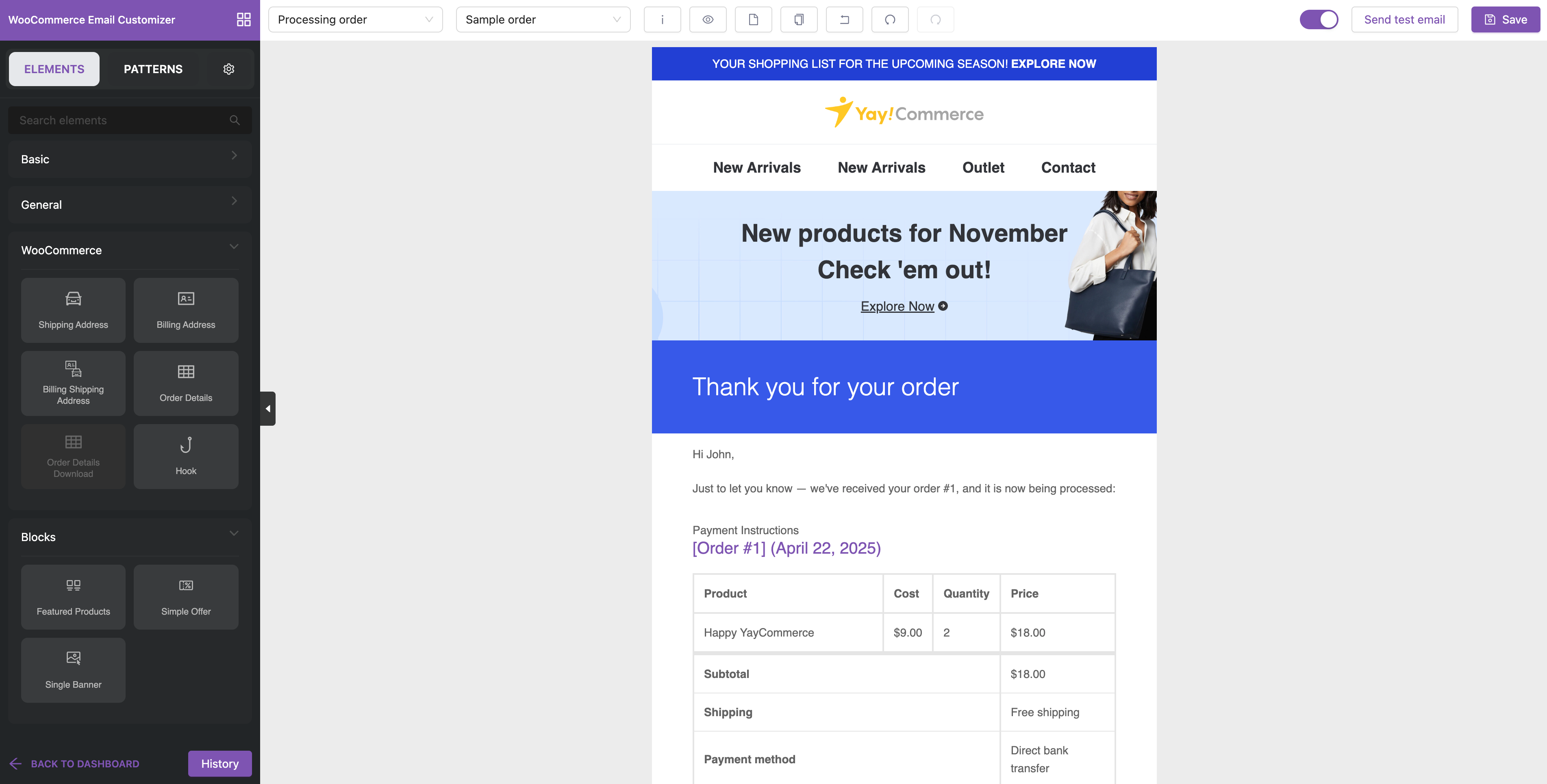
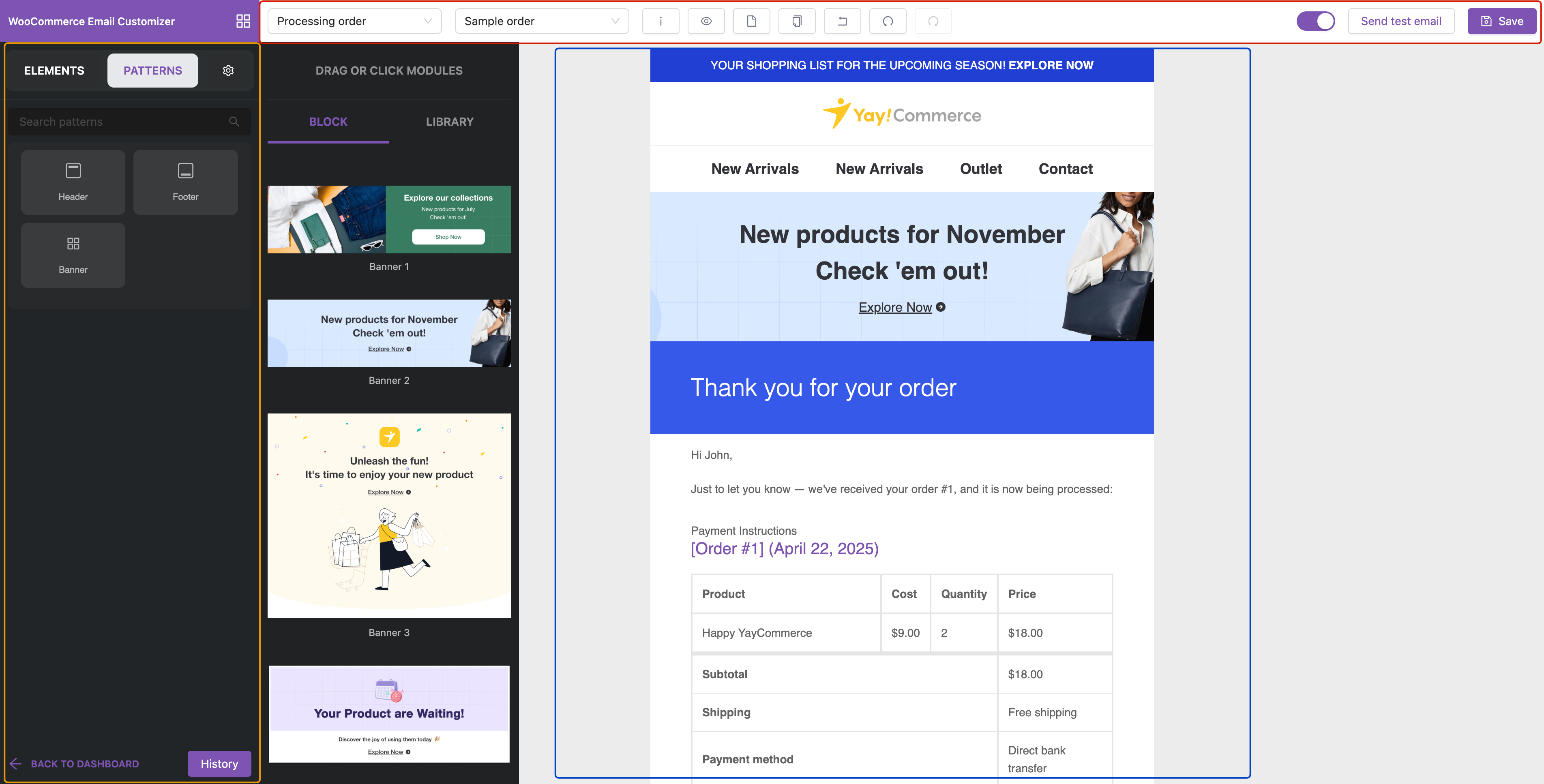
**YayMail - WooCommerce Email Customizer & Email Templates** is a powerful WordPress plugin that lets you visually customize all email templates sent by WooCommerce.
Its **drag and drop** editor makes it super easy to edit the emails to the desired state that suits your business. You can add images/videos, use different fonts, social icons, banners, and so on.
{% hint style="info" %}
**What's New in YayMail 4.0?**
* **Globals**: Creating global header and footer to insert the same design into all templates.
* **Premade Patterns**: Beautifully pre-designed groups of blocks for boosting your conversion rate through emails.
* **Saved to Library**: Keeping your creatives as patterns and reuse them anytime. (Premium-only)
* **Developer API**: Enabling developers to embed dynamic data into YayMail templates.
{% endhint %}
YayMail comes in various extensions:
* [**YayMail Free**](https://wordpress.org/plugins/yaymail): A free plugin to help you fully customize 15 standard Woo email templates.
* [**YayMail Pro**](https://yaycommerce.com/yaymail-woocommerce-email-customizer/): A paid plugin including premium features, faster support, AND compatible with various third-party WordPress/WooCommerce plugins.
* [**Email Customizer for WooCommerce Pro**](https://woocommerce.com/products/email-customizer-for-woocommerce/): Also available on WooCommerce marketplace under Woo’s official licensing system. This YayMail Pro version often comes with a better pricing offer and benefits from Woo's streamlined update and support infrastructure.
* [**YayMail Addons**](https://yaycommerce.com/yaymail-addons/): Paid add-ons to help you customize emails generated by third-party WooCommerce extensions.
You might be asking, why do we have to break down YayMail into so many addons?
Well, while there are hundreds of WooCommerce extensions developed by independent developers, a single WooCommerce store typically uses only a few of them. That’s why we build YayMail addons as separate, **modular extensions,** so you can install only what you need, without bloating your site with unnecessary features.
This approach keeps your store **lightweight** and gives you the flexibility to tailor your email customizations based on the specific plugins you actually use, such as WooCommerce Subscriptions, Bookings, Shipment Tracking, custom order status, etc.
In short, YayMail Addons let you customize emails exactly the way your store requires.
 {% endhint %}
YayMail comes in various extensions:
* [**YayMail Free**](https://wordpress.org/plugins/yaymail): A free plugin to help you fully customize 15 standard Woo email templates.
* [**YayMail Pro**](https://yaycommerce.com/yaymail-woocommerce-email-customizer/): A paid plugin including premium features, faster support, AND compatible with various third-party WordPress/WooCommerce plugins.
* [**Email Customizer for WooCommerce Pro**](https://woocommerce.com/products/email-customizer-for-woocommerce/): Also available on WooCommerce marketplace under Woo’s official licensing system. This YayMail Pro version often comes with a better pricing offer and benefits from Woo's streamlined update and support infrastructure.
* [**YayMail Addons**](https://yaycommerce.com/yaymail-addons/): Paid add-ons to help you customize emails generated by third-party WooCommerce extensions.
You might be asking, why do we have to break down YayMail into so many addons?
Well, while there are hundreds of WooCommerce extensions developed by independent developers, a single WooCommerce store typically uses only a few of them. That’s why we build YayMail addons as separate, **modular extensions,** so you can install only what you need, without bloating your site with unnecessary features.
This approach keeps your store **lightweight** and gives you the flexibility to tailor your email customizations based on the specific plugins you actually use, such as WooCommerce Subscriptions, Bookings, Shipment Tracking, custom order status, etc.
In short, YayMail Addons let you customize emails exactly the way your store requires.
{% endhint %}
YayMail comes in various extensions:
* [**YayMail Free**](https://wordpress.org/plugins/yaymail): A free plugin to help you fully customize 15 standard Woo email templates.
* [**YayMail Pro**](https://yaycommerce.com/yaymail-woocommerce-email-customizer/): A paid plugin including premium features, faster support, AND compatible with various third-party WordPress/WooCommerce plugins.
* [**Email Customizer for WooCommerce Pro**](https://woocommerce.com/products/email-customizer-for-woocommerce/): Also available on WooCommerce marketplace under Woo’s official licensing system. This YayMail Pro version often comes with a better pricing offer and benefits from Woo's streamlined update and support infrastructure.
* [**YayMail Addons**](https://yaycommerce.com/yaymail-addons/): Paid add-ons to help you customize emails generated by third-party WooCommerce extensions.
You might be asking, why do we have to break down YayMail into so many addons?
Well, while there are hundreds of WooCommerce extensions developed by independent developers, a single WooCommerce store typically uses only a few of them. That’s why we build YayMail addons as separate, **modular extensions,** so you can install only what you need, without bloating your site with unnecessary features.
This approach keeps your store **lightweight** and gives you the flexibility to tailor your email customizations based on the specific plugins you actually use, such as WooCommerce Subscriptions, Bookings, Shipment Tracking, custom order status, etc.
In short, YayMail Addons let you customize emails exactly the way your store requires.