> For the complete documentation index, see [llms.txt](https://docs.yaycommerce.com/yayreviews/llms.txt). Markdown versions of documentation pages are available by appending `.md` to page URLs; this page is available as [Markdown](https://docs.yaycommerce.com/yayreviews/features/review-form/custom-rating-types.md).
# Custom Rating Types
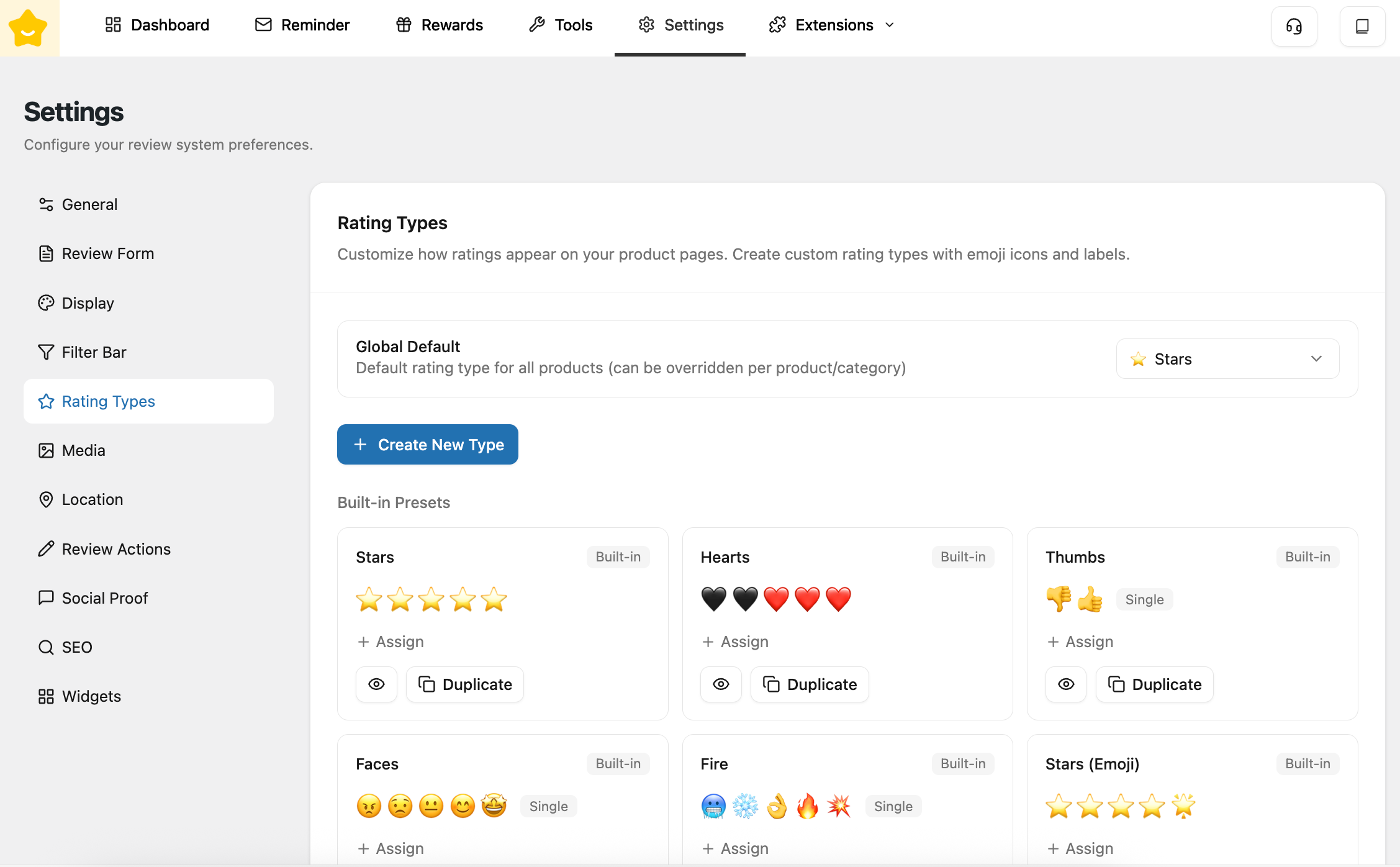
The **Rating Types** section allows you to customize how customers rate your products in reviews. Instead of being limited to traditional star ratings, YayReviews lets you use emojis and visual icons to better match your brand and product experience.
#### Global Default
* **Global Default** defines the default rating type applied to all products. This setting can be **overridden per product or per category** if needed.
#### Create New Type
Click **Create New Type** to build a custom rating system.
* **Name:** Set a name for your rating type. This is used internally to identify the rating configuration.
* **Start from Preset:** Quickly initialize your rating type using a predefined template. This helps speed up setup instead of starting from scratch.
* **Number of Levels:** Choose how many rating options customers can select (2, 3, 4, or 5 levels). More levels allow for more detailed feedback, while fewer levels keep things simple.
* **Display Mode:** Control how ratings are visually displayed:
* **Progressive**: Icons fill progressively up to the selected value (similar to star ratings).
* **Single**: Only the selected icon is shown (commonly used for emoji-style ratings).
* **Dropdown**: Select from a dropdown list.
* **Rating Values:** Configure the icon and label for each rating level:
* **Icon Type:** Choose between **Emoji** or **SVG/Image** for your rating icons.\
If **SVG/Image** is selected, you can upload your own custom SVG or image to fully match your store’s branding.
* **Label:** Add a descriptive label for each level (e.g. *Terrible → Excellent*), helping customers better understand each rating option.
* **Show Label:** Display text labels next to icons.
#### Built-in Presets
YayReviews comes with several ready-to-use rating presets:
* **Stars**: Classic 5-star rating system
* **Hearts**: Emotional or preference-based ratings
* **Thumbs**: Simple positive/neutral/negative feedback
* **Faces**: Mood-based reactions
* **Fire:** Intensity or excitement ratings
* **Stars (Emoji)**: Emoji-style star ratings
Each preset includes the following actions:
* **Assign:** Apply the rating type to specific products or categories. When assigned, this rating type will override the default rating type. Priority is applied as follows: **Product > Category** (product-level settings take precedence over category-level settings).
* **Preview (Eye icon):** View the settings of this rating type in a read-only mode. This allows you to review its configuration without making any changes.
* **Duplicate:** Create a copy of the preset to customize it without modifying the original built-in type.
{% hint style="info" %}
Built-in rating types cannot be edited directly, but you can duplicate them to create your own custom versions.
{% endhint %}
---
# Agent Instructions
This documentation is published with GitBook. GitBook is the documentation platform designed so that both humans and AI agents can read, navigate, and reason over technical content effectively. Learn more at gitbook.com.
## Querying This Documentation
If you need additional information that is not directly available in this page, you can query the documentation by asking a question.
Perform an HTTP GET request on the following URL with the `ask` and `goal` query parameters:
```
GET https://docs.yaycommerce.com/yayreviews/features/review-form/custom-rating-types.md?ask=&goal=
```
`ask` is the immediate question: it should be specific, self-contained, and written in natural language.
`goal` is what the user is ultimately trying to achieve, the reason they need the answer. Sharing it helps GitBook give you a better, more relevant answer. A goal is most helpful when it describes the outcome the user wants rather than restating the question. For example, with `ask=how do I create an API token`, a goal like `automate deployments from our CI pipeline` lets GitBook tailor the answer to that use case.
The response will contain a direct answer to the question and relevant excerpts and sources from the documentation.
Use this mechanism when the answer is not explicitly present in the current page, you need clarification or additional context, or you want to retrieve related documentation sections.