> For the complete documentation index, see [llms.txt](https://docs.yaycommerce.com/bookster/llms.txt). Markdown versions of documentation pages are available by appending `.md` to page URLs; this page is available as [Markdown](https://docs.yaycommerce.com/bookster/addons/booking-process.md).
# Booking Process
The **Booking Process** addon works as an extension of the **Booking Template** addon.\
It allows you to customize the booking flow by reordering steps and configuring how agents are selected during the booking process.
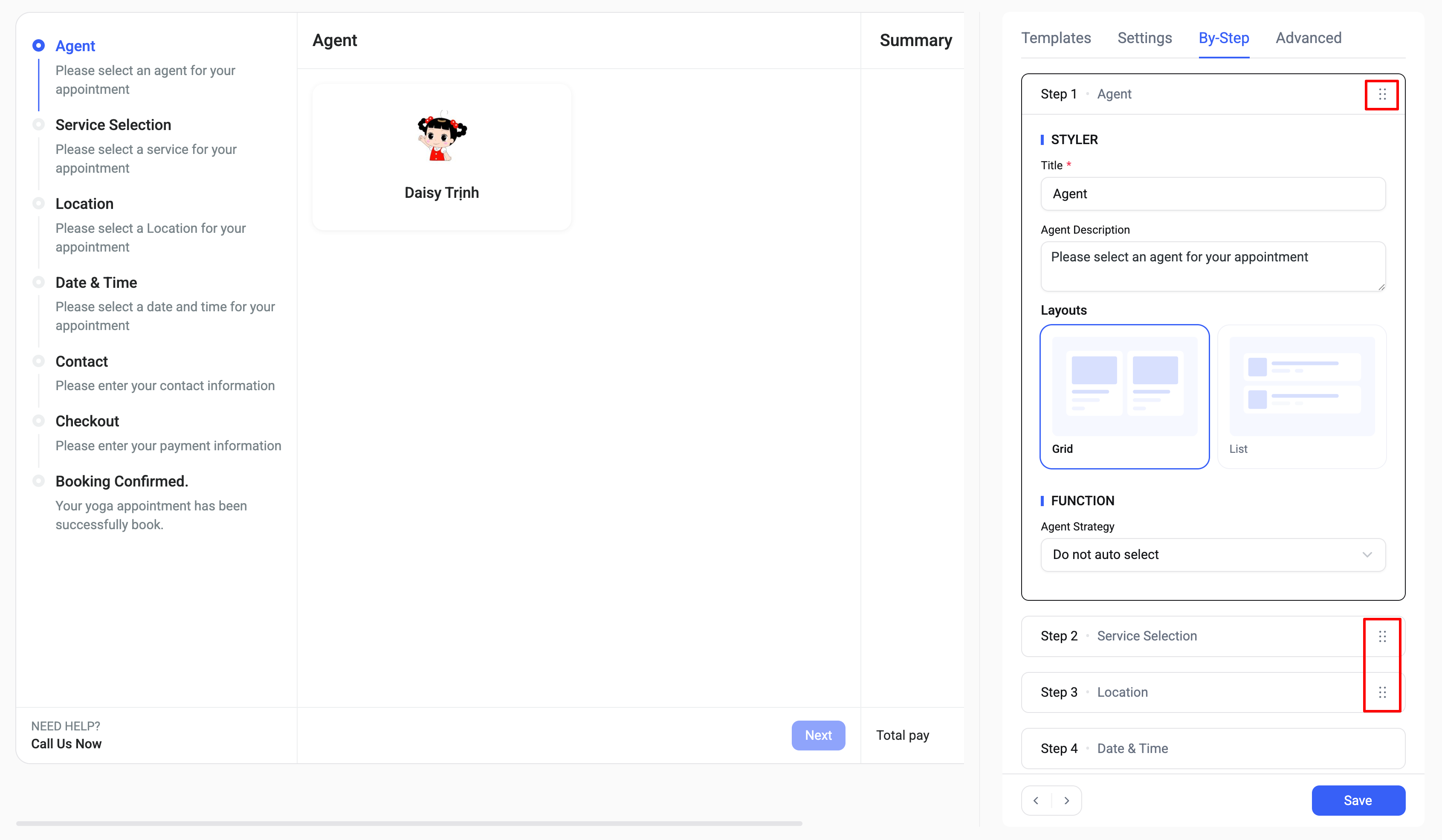
With this add-on, you can easily change the order of booking steps such as **Agent, Service, Location, Date & Time** by clicking the **drag icon (⋮⋮)** at the top-right corner of each step.
This gives you full control over how customers go through the booking journey.
In addition, the **Function** section allows you to define how items are automatically selected or handled for different booking steps.
**Available options:**
* **Do not auto select:** Users must manually choose an item in the corresponding step.
* **First time auto select:** The system automatically selects an item the first time, but users can still change it.
* **Always auto select:** The system always automatically selects an item and skips manual selection when possible.
This feature helps optimize the booking flow and reduce friction for customers.